The platform · implemented by ERPNova
Give each team the tools to move work forward.
Connect orders, stock, production and finance with Frappe ERP. Add dedicated apps where your team needs them. ERPNova helps you choose the products, define the handoffs and put the workflow into use. Screens show sample figures, not ERPNova customer results or pricing. Availability and configuration are confirmed during evaluation.
Connected ERP modules
Frappe ERP
Follow an order through fulfilment and accounting. Purchasing and manufacturing support the stock you need to deliver it.
Separate Frappe apps
CRM & HR
Evaluate Frappe CRM for a dedicated sales pipeline and Frappe HR for employee operations. Include app setup and required ERP connections in the scope.
Our proprietary product
YoloWorks
Field sales and distribution software, separate from Frappe ERP. Any ERP connection needs agreed mapping and testing.
Inside Frappe ERP
Follow the order across departments.
Start with the transaction your team needs to complete. Configure the records and responsibilities that carry it from one department to the next.
Sell and fulfil
Use quotations and sales orders to capture demand. Follow deliveries, invoices and payments through the sales process.
Explore salesBuy, stock and make
Manage supplier orders and warehouse movements. For production, connect bills of materials, work orders and job cards.
Explore manufacturingReview the financial record
Bring receivables, payables and financial statements into the review. Agree the chart of accounts and reporting dimensions with finance.
Explore accountingProduct evidence
See the report your records feed.
Use a real reporting requirement to evaluate the setup. The profit and loss view is a starting point for discussing how your finance team reviews income and expenses.
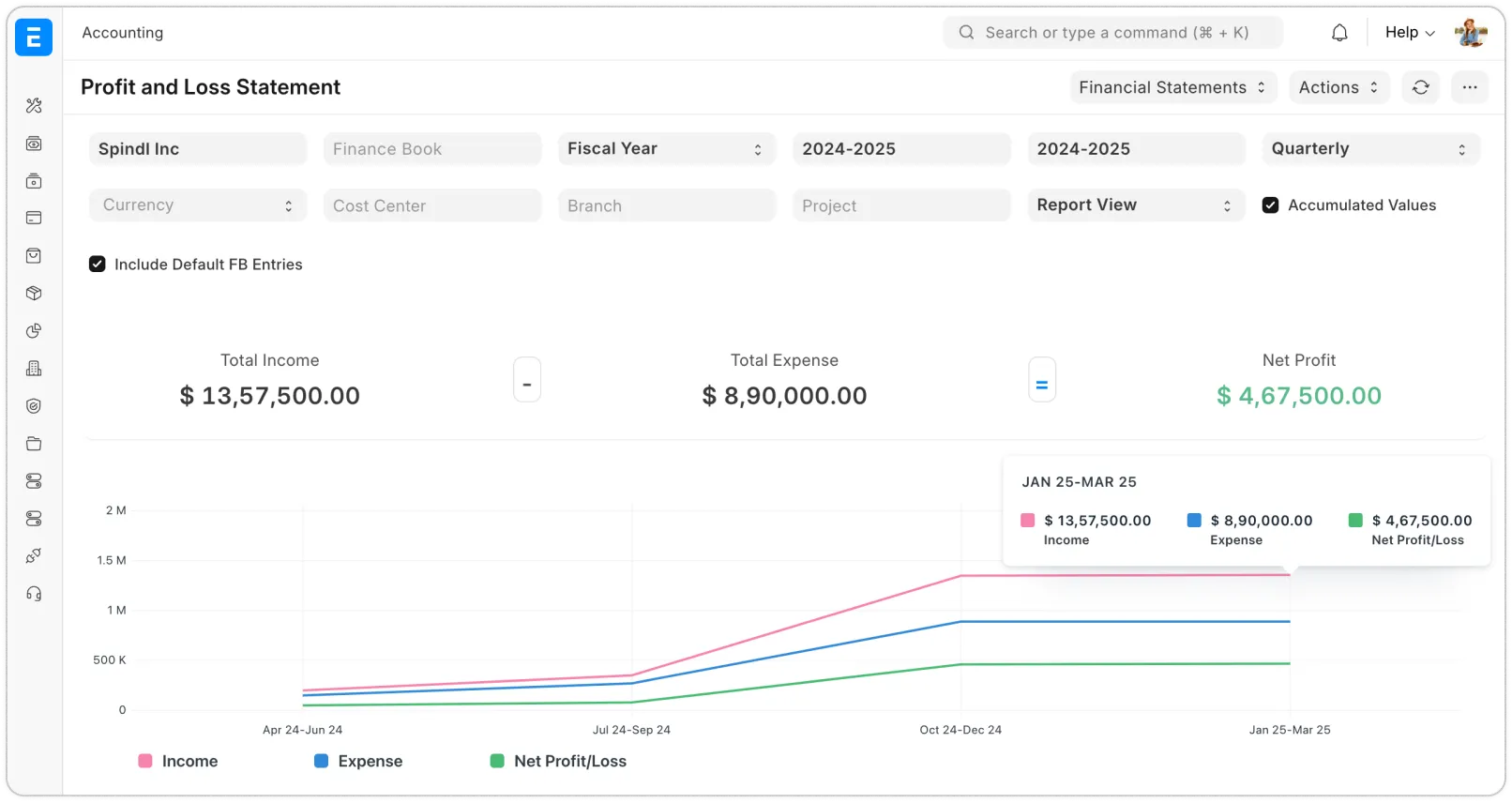 Open full-size screenshot
Work back from the decision.
Bring a management report and a sample transaction. We will agree the account structure, required dimensions and reconciliation checks before configuring the first reporting cycle.
Projects, quality and assets can also affect that scope. Include those dependencies when deciding what the first release must cover.
Plan your finance workflowYoloWorks · our proprietary product
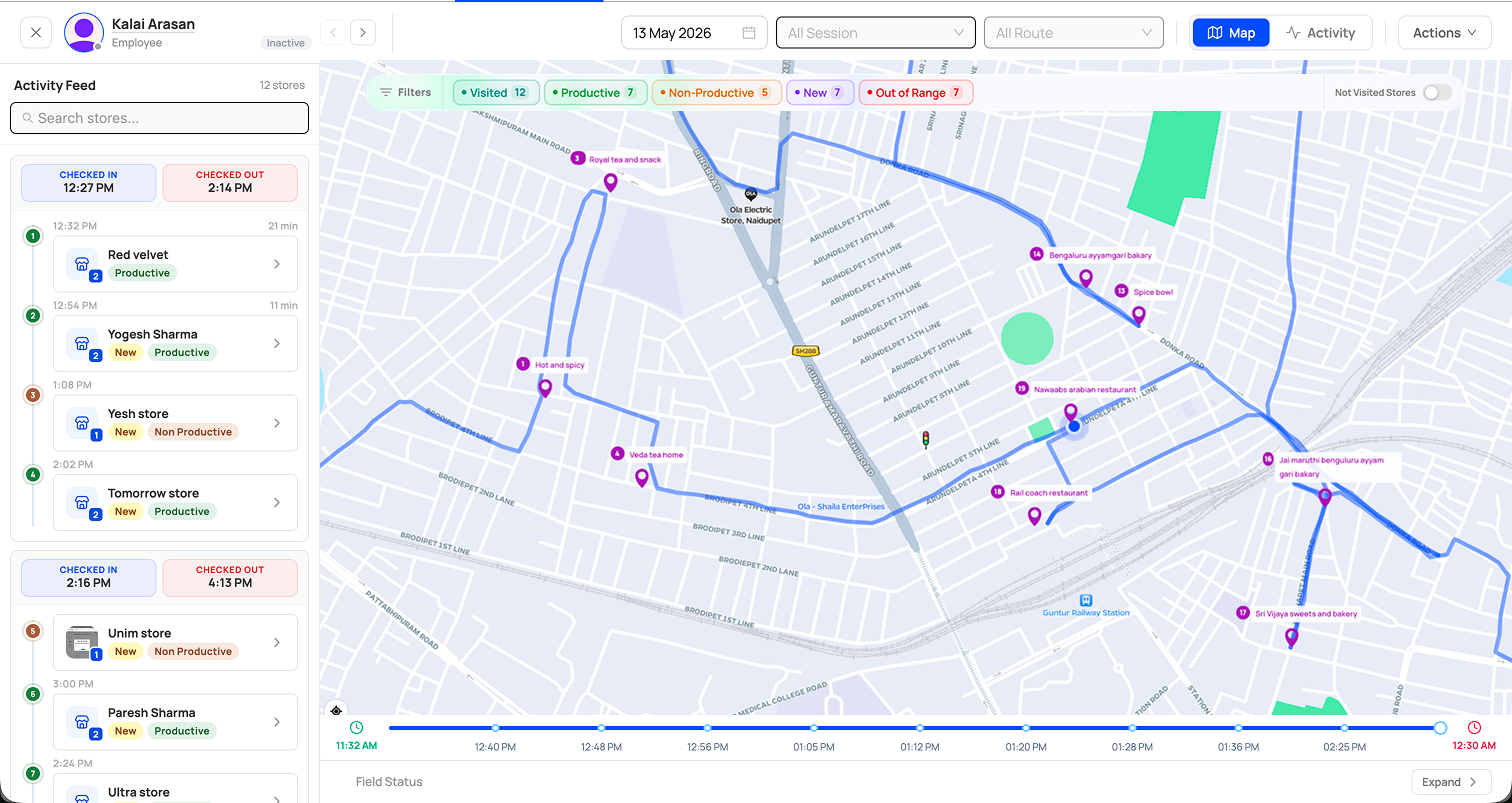
Take the review beyond the office.
Use YoloWorks for field activity and distributor-to-outlet sales. Keep the product choice and any ERP connection explicit in your implementation plan.
 Open full-size screenshot
Choose the view your team needs.
Field sales tracking brings GPS, store visits and rep activity into view. Distribution management covers primary and secondary sales, with area reporting.
Explore field sales trackingExplore distribution management
Technical decisions
Agree how the systems will work together.
Connections, infrastructure and AI each need an owner and a testable scope. Make these decisions alongside the business workflow.
Integrations
Define record ownership, field mapping, transfer direction and exception handling. Test representative transactions before relying on a connection.
Scope your connectionsHosting
Agree who operates the deployment, manages updates and checks recovery. Match responsibilities to the hosting arrangement you choose.
Review hosting optionsAI in ERP
Choose a specific assistive task. Define the input data, human review and acceptance criteria before deciding whether to include it.
Evaluate an AI use caseERPNova delivery
Know what your rollout includes.
Your proposal separates product capabilities, configuration, data preparation, custom development and integrations. Each has an owner and a sign-off point.
Define the first release
Walk one complete process with the people who do the work. Record the exceptions, required apps and reports that determine whether the setup is ready.

Prove the workflow
Prepare sample data and test transactions across the selected modules. Reconcile the results with the operational and finance owners.
Prepare the handover
Agree migration checks, training, cutover responsibilities and support. Put later requirements in a separate backlog with a clear decision on timing.