
Solutions
Build around the work your team needs to finish.
A finance lead needs a balance they can explain. A warehouse supervisor needs to know what can ship. Explore Frappe ERP through the responsibilities and transactions that shape your working day.
By responsibility
Start with the decision you own.
Review a close, an operational handoff or a system boundary. Each guide shows the records to examine and an exception to test with your team.
CFO / Controller
Start with the reconciliation that holds up the close.
Owner / Founder
Pick the decision you keep making from memory.
Operations Head
Test the exception that crosses departments.
IT Lead
Bring the integration that must not lose a record.
Accounting firms & CPAs
Agree who prepares and who reviews.
Private equity
Bring the report that requires the most adjustments.
By company size
Match the release to your capacity.
Revenue bands help you find a starting point. Entity count, process complexity and the time your team can commit determine the actual scope.
By industry
Follow the work in your industry.
Examine a production run, a delivery or an administrative purchase. Keep specialist systems and responsibilities visible when deciding what belongs in Frappe ERP.
Manufacturing
Start with a representative job and its exceptions.
Distribution & FMCG
Use an order with a partial delivery and a return.
Financial services
Start with corporate operations, not the core ledger of a financial product.
Healthcare administration
Begin with de-identified operational records.
EdTech
Separate course access, payment and earned revenue.
Additional industry and regional coverage
Dedicated agri-processing, NGO and regional guides are planned. The current menu does not offer those pages. For work in the United States, Canada, Africa, Indonesia, Malaysia or Egypt, review local tax, payroll and reporting requirements as part of the proposed scope. Chennai is our delivery location.
Choose the product scope
Keep each application’s job clear.
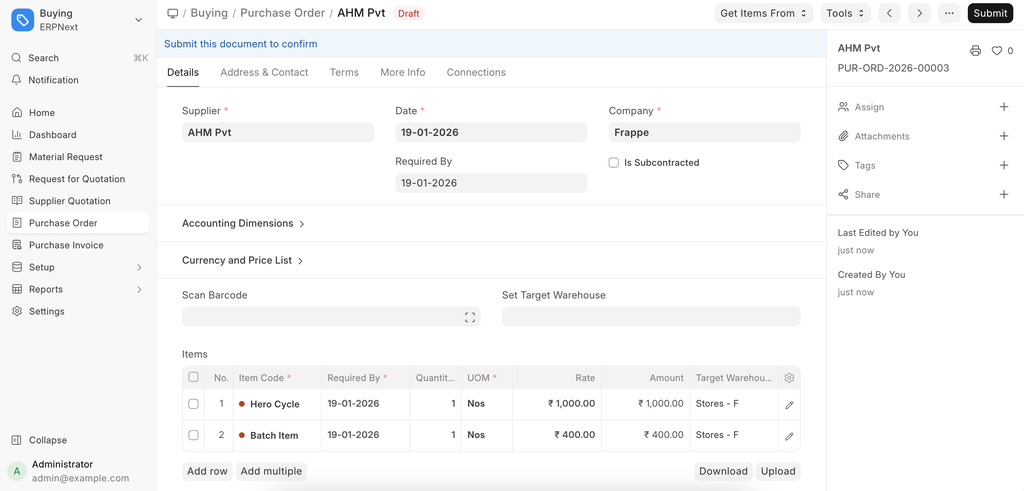
Frappe ERP connects core business records. Frappe CRM and Frappe HR are separate apps. YoloWorks is our proprietary field-sales and distribution product; a connection to ERP requires its own mapping and testing. The Purchase Order screen shows sample records, not an ERPNova client record, and may show an older interface.
Explore the platform and connected products
Connected modules
Connect the records your teams use every day.
- Accounting
Follow invoices, payments and business balances.
- Purchasing
Connect supplier orders, receipts and bills.
- Inventory
Track the goods moving through your warehouses.
- Sales & CRM
Follow customer enquiries through to orders.