IT Lead
Keep ownership of the system after go-live.
The difficult part of an ERP integration is often the failed request, not the successful demo. Define who owns each record, how changes reach production and how the team restores service before connecting Frappe ERP to the rest of your stack.
Explore the workflow
Design for the next failure and the next release.
Bring the integration that must not lose a record.
Start with its payload, system owner and failure history. We will separate configuration from code that needs a release and maintenance plan.
Integration design
Assign record ownership before using the API
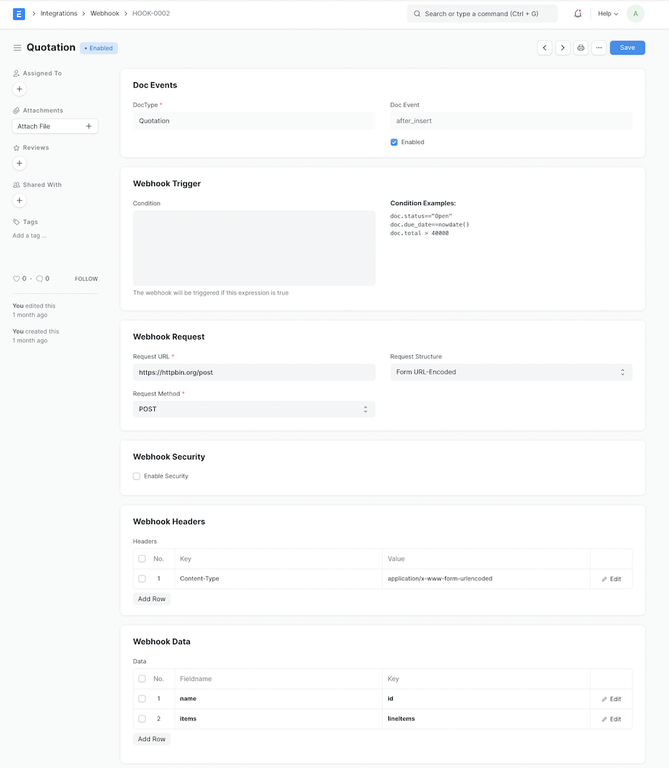
Frappe exposes document operations through its REST API. That gives an integration a transport, not a business contract. Decide which system creates the customer, which identifier survives migration and which edits are allowed to flow back.
Test it with your team
Submit the same external order twice, then send a correction after invoicing. ERPNova scopes duplicate detection, retry behavior and reconciliation as integration work rather than assuming the endpoint provides them.
Access review
Test access through the real entry points
Role permissions govern actions on document types. User permissions can narrow record access. Review browser access, report exports and API credentials against the same responsibility matrix; a hidden menu item is not a security boundary.
Test it with your team
Log in as a warehouse user and as an integration user. Attempt access to a different Company and an unauthorized document, then record the expected denial in the acceptance test.
Release recovery
Prove that a release can be recovered
A backup policy needs a restore exercise. Confirm the selected host’s database and file backup coverage, retention and recovery procedure. Custom apps need version compatibility checks before a framework or ERP upgrade reaches production.
Test it with your team
Restore an approved test backup into an isolated environment. Validate files and a representative transaction, measure the actual recovery time and write down who can execute the procedure.
Operational controls and reporting
Give the review a clear owner.
Agree the scope
Hosting, identity and integrations are separate scope decisions. Frappe CRM and Frappe HR are separate applications with their own compatibility checks. An API-backed AI feature also needs a provider and data-handling assessment. Screens show sample records, not ERPNova client results, and may show an older interface. We verify behavior against the version and apps selected for your implementation.
ERPNova delivery
Prove the fit with your records.
Produce the system map
ERPNova documents record ownership, credentials, interfaces and the applications that stay in place.
Build the failure tests
We implement agreed integrations with fixtures for duplicate requests, unavailable services and rejected records.
Hand over operations
We supply the agreed source, release instructions and recovery runbook, with support boundaries recorded in the proposal.

Connected modules
Review the systems behind your business records.
- Integrations
Define mapping, retries and reconciliation.
- Hosting
Compare backup and deployment responsibilities.
- AI in ERP
Scope assisted work with human review.